

Solid-State Drive (SSD): The Fast, Reliable Future of Computer Storage
Introduction
A Solid-State Drive (SSD) is a modern data storage device that uses flash-based memory instead of mechanical spinning disks found in traditional Hard Disk Drives (HDDs). SSDs are faster, quieter, and more durable, making them the preferred choice for modern computers, gaming systems, and data centers.
Since their introduction, SSDs have revolutionized how computers access and store information — reducing boot times, increasing performance, and enhancing system responsiveness.
How Solid-State Drives Work
Unlike HDDs, which rely on magnetic platters and read/write heads, SSDs use NAND flash memory chips to store data electronically. Each memory cell holds bits of data that can be accessed almost instantly.
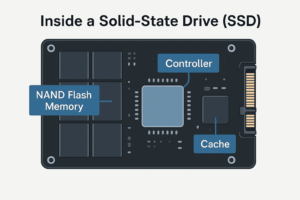
An SSD has three main components:
-
Controller – manages how data is read, written, and stored.
-
NAND Flash Memory – stores the actual data.
-
Cache/DRAM – boosts data transfer speed.
Related Read: Hard Disk Drive (HDD) – Compare how mechanical storage differs from SSD technology.
Types of Solid-State Drives
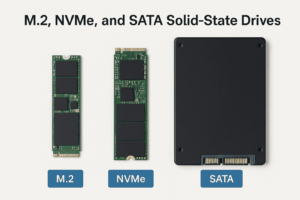
SSDs come in several formats and interfaces suited to different systems and performance needs:
-
SATA SSDs – Common and affordable, compatible with older systems.
-
NVMe SSDs – Ultra-fast drives that connect via the PCIe interface.
-
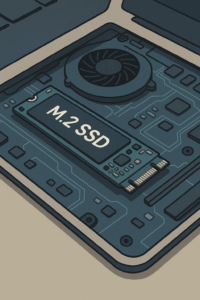
M.2 SSDs – Compact design used in laptops and modern desktops.
-
U.2 and PCIe Add-in Cards – Typically used in servers and high-performance workstations.
Advantages of Solid-State Drives
SSDs outperform HDDs in nearly every category, offering users faster and more reliable performance:
-
Speed: Near-instant access to files and programs.
-
Durability: No moving parts mean reduced wear and tear.
-
Power Efficiency: Consumes less energy and generates less heat.
-
Noise-Free Operation: Completely silent during use.
-
Improved Boot Times: Systems boot and load applications within seconds.
Common Applications of SSDs
SSDs are now found across many devices, including:
-
Laptops and Ultrabooks – for lightness and battery efficiency.
-
Desktops and Gaming PCs – for faster load times and better gaming performance.
-
Servers and Data Centers – where speed and reliability are critical.
-
Embedded Systems and Tablets – where compact storage is essential.
SSD vs HDD: Key Differences
| Feature | Solid-State Drive (SSD) | Hard Disk Drive (HDD) |
|---|---|---|
| Speed | Extremely fast (up to 7,000 MB/s) | Slower (100–200 MB/s) |
| Durability | Shock-resistant | Prone to damage from movement |
| Power Use | Energy efficient | Higher power consumption |
| Noise | Silent | Audible spinning and clicking |
| Price per GB | More expensive | More affordable |
| Heat Output | Low | Higher due to moving parts |
Related Read:
-
Computer Cooling Systems – Learn how efficient cooling supports both SSDs and HDDs.
How to Choose the Right SSD
When upgrading or building a PC, consider:
-
Interface: SATA for compatibility, NVMe for top performance.
-
Capacity: 500GB–1TB is ideal for most users.
-
Endurance: Check the TBW (Terabytes Written) rating for longevity.
-
Budget: Balance price and performance based on your use case.
Helpful Resource: Computer Hardware Guide – for compatibility and installation details.
SSD Maintenance and Lifespan
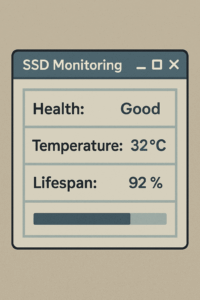
While SSDs are durable, proper care ensures longevity:
-
Enable TRIM: Allows the OS to clean unused data blocks efficiently.
-
Avoid Full Capacity: Keep at least 10–15% free space.
-
Monitor Health: Use SSD tools to track temperature and write cycles.
-
Regular Backups: Protect against data corruption or unexpected failure.
A quality Power Supply Unit (PSU) also contributes to SSD reliability by providing consistent voltage and protection.
Future of Solid-State Drives
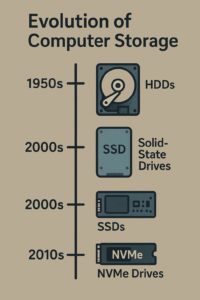
The next wave of SSD technology includes 3D NAND, QLC memory, and PCIe 5.0 interfaces — pushing data transfer rates even higher. As storage evolves, SSDs will become cheaper, larger, and more energy-efficient.
With advances in modern motherboard chipsets, SSDs now communicate directly with CPUs, removing bottlenecks and making high-speed data transfer the new standard.
Conclusion
SSDs represent the future of computer storage, offering unmatched speed, reliability, and energy efficiency. Whether you’re upgrading an old computer or building a new high-performance system, an SSD is the single most impactful upgrade you can make.
Upgrade your PC performance today with expert setup and installation support from AllTech Solutions.